
Most AI disappointments aren't about the AI. They're about the ground it's standing on.
Most of the AI disappointments I hear about from small business owners trace back to the same handful of mistakes. None of them are about picking the wrong AI model. They're about the information the AI is working from.
Here are the six I see most, and what to do instead.
1. Moving everything into one tool
The trap: moving your CRM, accounting, and file storage into one app so "everything is in one place."
The fix: keep specialized data in specialized tools. Give each type of information one official home, link between them, and let connectors bring them together for AI. Migrations create a second copy that goes out of date, and out-of-date copies are what AI finds first.
2. Building the perfect system before using it
The trap: weeks of designing databases and workflows before any real work goes in.
The fix: start with the basics, use them on real work, and improve as you go. Your system should grow from actual use, not guesses. Simple and used beats elaborate and ignored.
3. Too many fields
The trap: every database has fifteen fields "just in case." Nobody fills them in, so the data is half-empty, and AI can't tell an empty field from a real "no."
The fix: start with three to five fields that matter. Add more only when you keep needing something that isn't captured. This is the most common problem I've cleaned up in CRMs over eight years as a Salesforce admin and developer, and it applies to every tool.
4. Letting information go stale
The trap: the pricing page is a year old. The process changed in March. The AI doesn't know that, and it will quote last year's price with total confidence.
The fix: every important page gets an owner and a review date. Spend 20 minutes every Friday archiving old versions and fixing what's out of date. Out-of-date information is the most common cause of wrong answers.
5. Giving AI the keys to everything
The trap: connecting an AI agent to every tool with full access and letting it send, update, or delete without review.
The fix: start read-only. Then let AI draft while people approve. Limit access to what each job needs, and keep payroll, HR, and sensitive client data in restricted areas. AI tools usually see what the person using them can see, so permissions matter.
I sort every task three ways: Deputize (AI does it, a person spot-checks), Duet (AI drafts, a person decides), and Defend (keep it human). Sending messages, changing appointments, and changing records start in Duet until there's evidence they can move.
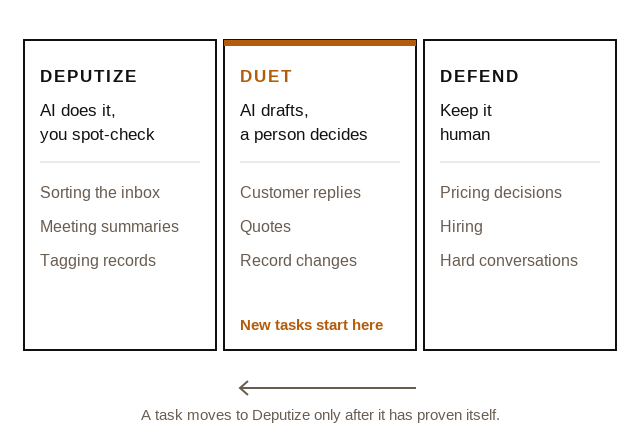
New tasks start in Duet. They earn their way to Deputize.
6. Expecting AI to fix the mess
The trap: hoping AI will make sense of scattered, undocumented information on its own.
The fix: organize first, automate second. AI is only as good as what it's grounded in. If a new hire couldn't answer the question from your documents, AI can't either. The difference is that the new hire would ask you. The AI will guess.
The pattern behind all six
Every one of these comes from the same instinct: skipping to the exciting part. Buy the tool, turn on the agent, connect everything. It's understandable. But the businesses I see getting real value from AI did the unglamorous part first. They picked a system of record, wrote down how they work, kept it current, and started with one small workflow and a person in the loop.
That's not slower. It's the fastest way to AI you actually trust.
A quick self-check
- Can you say where the current price list lives in five seconds?
- Does every important page have an owner and a review date?
- Does any AI tool you use have more access than its job needs?
- Is there one workflow where AI drafts and a person approves today?
If you answered no to two or more, start with a Company Profile page and a "where does it live?" map.
Get the free guide. Grounded covers these mistakes in more detail, plus a 30-day plan to avoid them. Download the free Grounded guide.